Command Center for Your Custom Builds
Custom home projects have hundreds of moving parts. BuildTools brings everything together in one powerful dashboard—alerts, schedules, budgets, and team activity—so you always know exactly where every project stands.
Sound Familiar?
If any of these sound familiar, you're not alone.
- 1
Juggling multiple spreadsheets, apps, and paper files to track project status
- 2
Spending hours each week compiling updates for clients and stakeholders
- 3
Missing critical deadlines because tasks fell through the cracks
- 4
No clear visibility into which projects need immediate attention
- 5
Team members working from outdated information
One Dashboard. Complete Control.
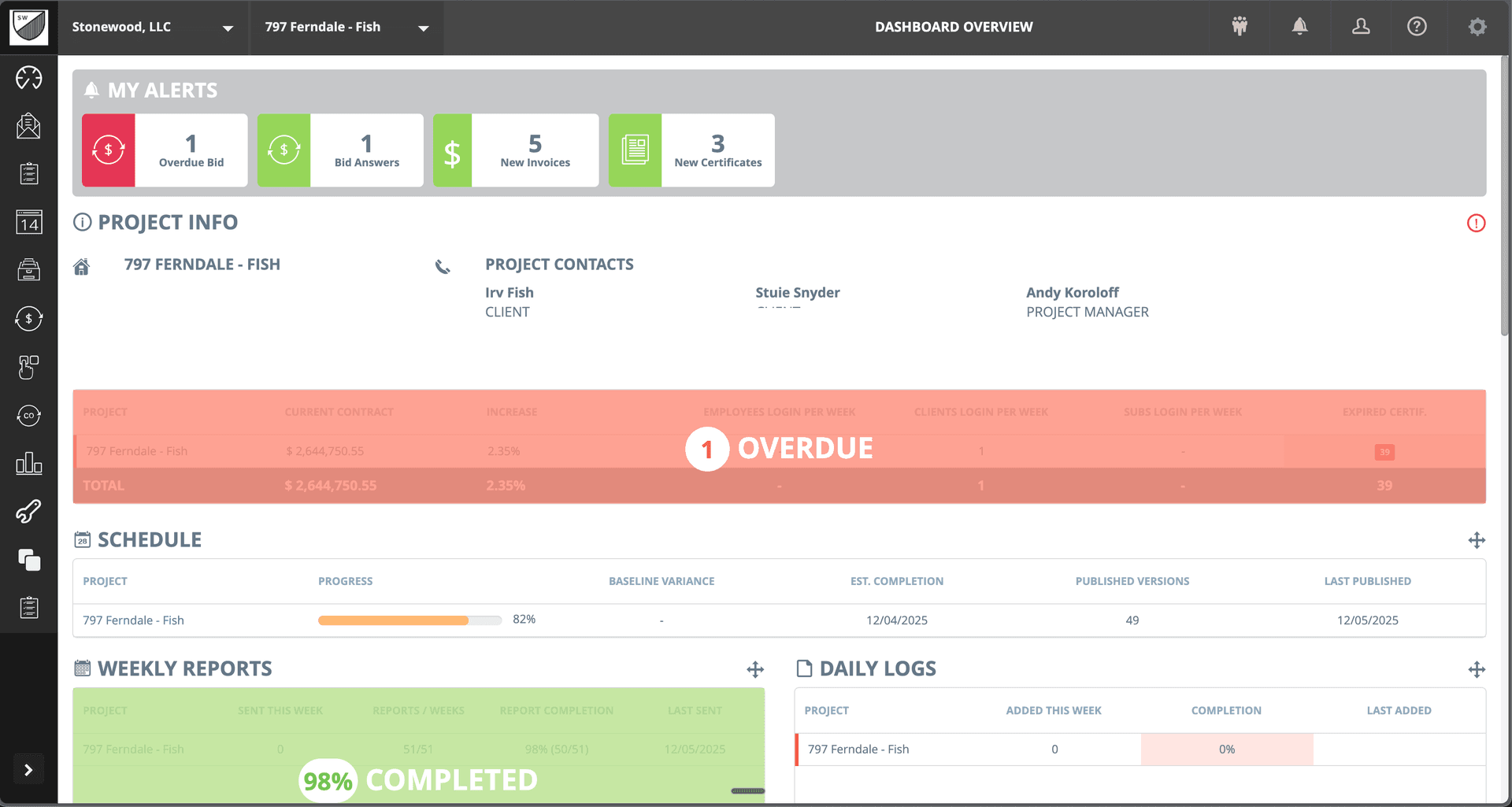
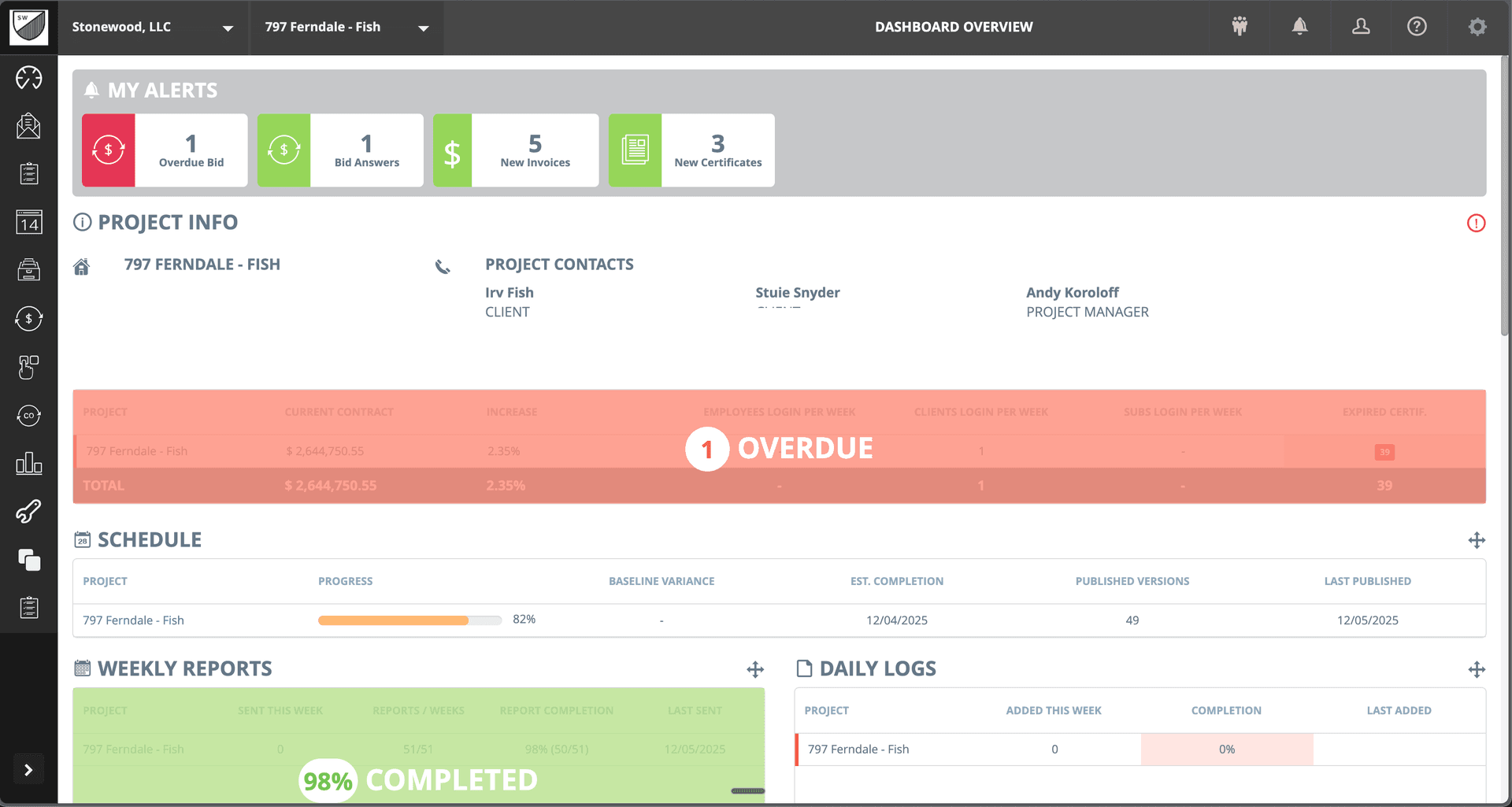
BuildTools consolidates your entire operation into a single, intelligent dashboard. See overdue items, pending approvals, schedule progress, and financial status at a glance. No more hunting through emails or wondering where things stand.
Powerful Features for Project Management
Everything you need to manage project management effectively.
Smart Alerts System
Get notified instantly about overdue bids, pending approvals, new invoices, and expiring certificates. Never miss a critical action item again.
Real-Time Progress Tracking
See exactly where each project stands with visual progress indicators. Track schedule completion, baseline variance, and estimated completion dates.
Centralized Project Information
All project contacts, contract values, and key metrics in one place. Access everything you need without switching between systems.
Weekly Reports & Daily Logs
Automated tracking of reports sent, completion rates, and daily log entries. Know your team is documenting properly without micromanaging.
Multi-Project Overview
Monitor all active projects from a single view. Compare progress, identify bottlenecks, and allocate resources effectively.
Team Activity Monitoring
Track employee logins, client engagement, and subcontractor activity. See who's engaged and who might need follow-up.
See It In Action
Real interface, real data, real results.
Why Builders Choose BuildTools
Real benefits that impact your bottom line.
Save 5+ Hours Weekly
Stop compiling status reports manually. BuildTools automatically aggregates project data so you can focus on building.
Catch Issues Before They Escalate
Smart alerts highlight overdue items and potential problems before they become expensive mistakes.
Keep Clients Confident
Professional dashboards and automated updates show clients their project is in capable hands.
Scale Your Operation
Manage more projects without adding administrative overhead. The system scales with your business.
How Builders Use This Feature
Real scenarios from real custom home builders.
Morning Project Review
Start each day with a clear view of what needs attention. Review alerts, check overdue items, and prioritize your team's work in minutes.
Focused, productive days with fewer surprises
Client Status Meetings
Pull up the project dashboard during client calls. Show schedule progress, recent activity, and upcoming milestones without preparation.
Professional, confident client interactions
Team Accountability
Monitor daily log completion rates and report submissions. Identify team members who may need additional support or training.
Consistent documentation across all projects
"Before BuildTools, I spent every Monday morning pulling together project updates. Now I open one dashboard and know exactly where everything stands."
Mike Harrison
Harrison Custom Homes
Frequently Asked Questions
Common questions about project management.
How long does it take to get all my projects into BuildTools?
Can clients see the project dashboard?
Does BuildTools work on mobile devices?
Explore Related Features
See how other BuildTools features work together.
Scheduling
Custom home schedules are complex—dozens of phases, hundreds of tasks, and constant changes. BuildTools gives you a visual, intelligent scheduling system that handles dependencies, notifies stakeholders, and adapts when reality changes.
Learn moreCommunication
Email threads get buried. Texts disappear. Phone calls leave no record. BuildTools gives you a unified communication hub where every message is logged, searchable, and connected to your project data.
Learn moreBudget Tracking
Custom home budgets are complex—thousands of line items across hundreds of cost codes. BuildTools gives you real-time visibility into budget vs. actual, change order impacts, and remaining funds so you can protect your margins.
Learn moreReady to Transform Your Project Management?
See how BuildTools can help your business save time, reduce errors, and build more profitably.