Every Conversation in One Place
Email threads get buried. Texts disappear. Phone calls leave no record. BuildTools gives you a unified communication hub where every message is logged, searchable, and connected to your project data.
Communication Chaos Costs You
If any of these sound familiar, you're not alone.
- 1
Important emails lost in overflowing inboxes
- 2
Text message history scattered across personal phones
- 3
No record of phone conversations when disputes arise
- 4
"I never got that message" becoming a common excuse
- 5
Hours spent searching for that one email from six months ago
Unified Communication Hub
BuildTools centralizes all project communication in one searchable system. Send messages to clients, trades, and team members. Attach files from your project library. Link messages to specific items. Create an automatic paper trail.
Powerful Features for Communication
Everything you need to manage communication effectively.
Rich Message Composer
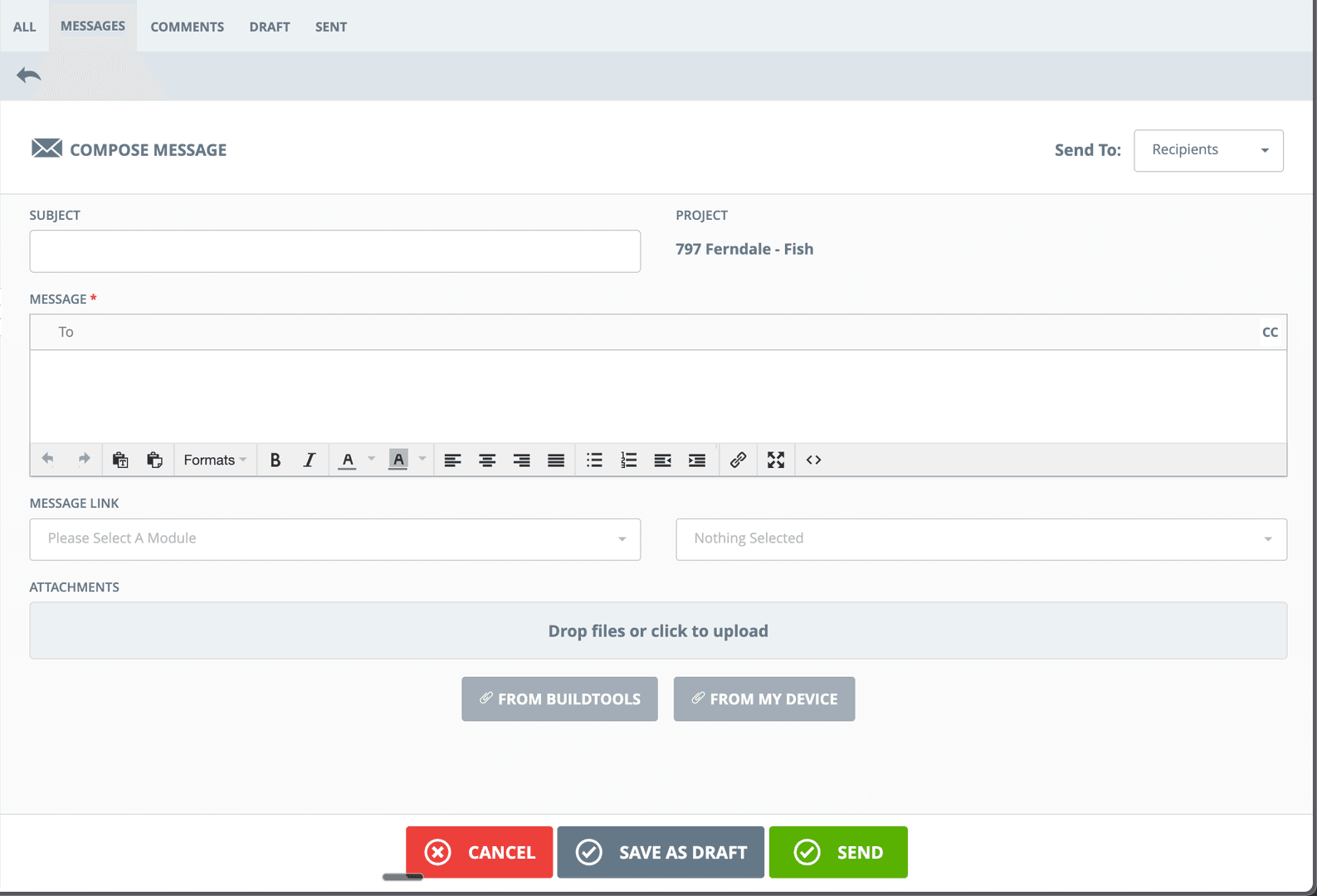
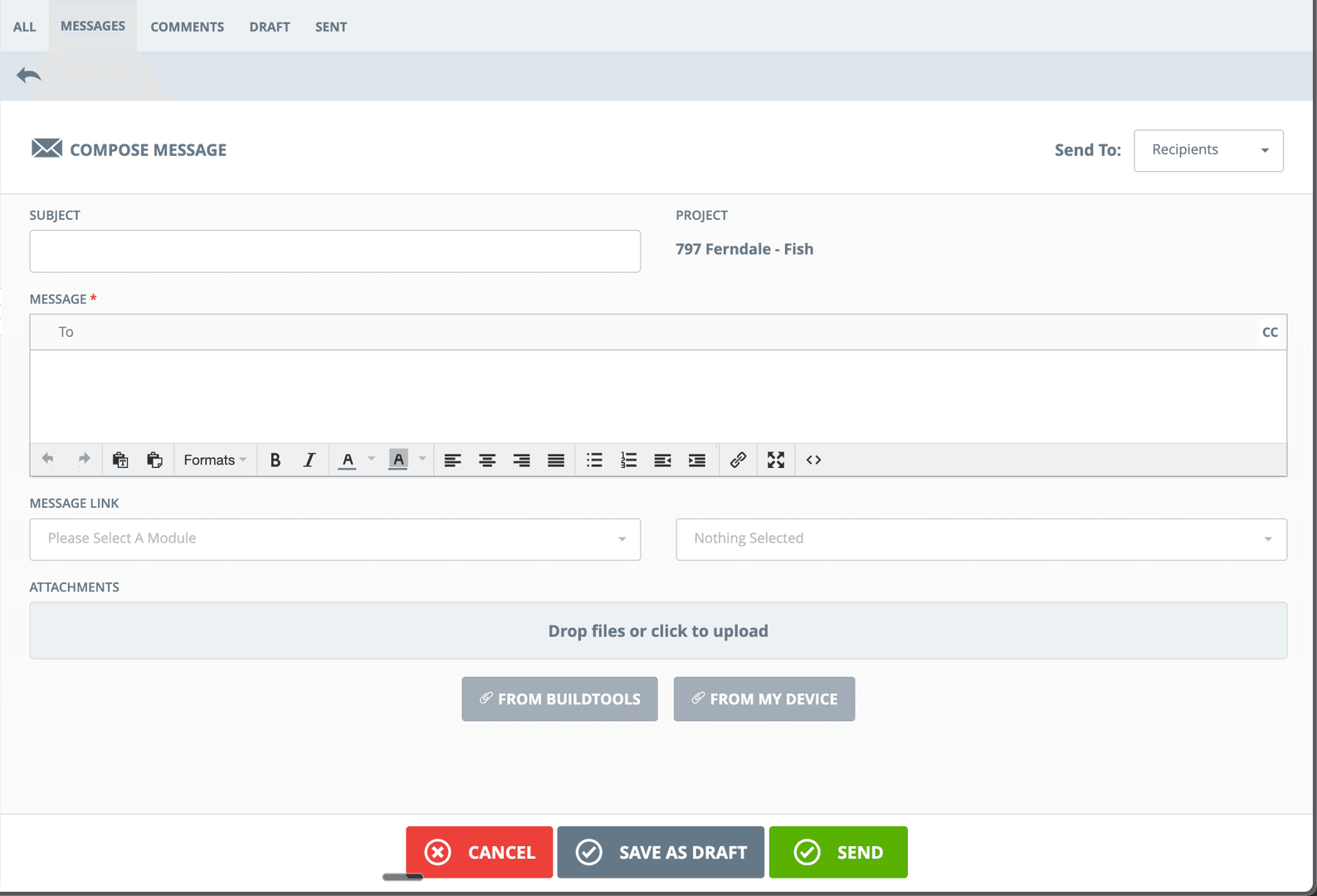
Professional messaging with formatting, attachments, and project linking. Write once, reach the right people, keep a perfect record.
Message Categories
Organize communication into Messages, Comments, Drafts, and Sent. Filter and find exactly what you're looking for.
Module Linking
Connect messages to schedules, selections, change orders, or any project item. Context is preserved automatically.
Flexible Attachments
Attach files from your BuildTools project library or upload from your device. All attachments stored with the project record.
Draft & Review
Save messages as drafts to review or edit later. Never send an incomplete or incorrect message again.
Complete Message History
Every message sent through BuildTools is logged forever. Search by date, recipient, project, or content.
See It In Action
Real interface, real data, real results.
Why Builders Choose BuildTools
Real benefits that impact your bottom line.
Create an Audit Trail
Every communication documented and timestamped. Protect yourself when questions arise about what was said and when.
Save Time Searching
Find any message in seconds with powerful search. Filter by project, date, person, or content.
Professional Client Experience
Clients receive well-formatted, branded communications. Show them you're organized and professional.
Team Alignment
Everyone sees the same information. No more "I didn't get that email" or conflicting conversations.
How Builders Use This Feature
Real scenarios from real custom home builders.
Selection Confirmations
Send clients a summary of their selections with photos attached. Link to the selections module for easy reference. Document their approval.
Clear record of client decisions
Change Order Communication
Explain proposed changes to clients with attached documents. Link directly to the change order for digital approval.
Faster approvals, fewer misunderstandings
Trade Coordination
Message trades about upcoming work with schedule links. Share relevant drawings and specifications in one communication.
Better-prepared trades, fewer mistakes
"We had a dispute with a client about selections they claimed they never approved. Pulled up the BuildTools message with their acknowledgment attached. Case closed."
Sarah Chen
Chen Construction
Frequently Asked Questions
Common questions about communication.
Do messages go to email or just within BuildTools?
Can I send messages to people outside BuildTools?
How long are messages stored?
Explore Related Features
See how other BuildTools features work together.
Project Management
Custom home projects have hundreds of moving parts. BuildTools brings everything together in one powerful dashboard—alerts, schedules, budgets, and team activity—so you always know exactly where every project stands.
Learn moreEstimates & Proposals
Accurate, professional estimates win jobs. BuildTools estimating tools help you price confidently, present beautifully, and convert estimates to projects seamlessly—no re-entering data, no lost information.
Learn moreFinancial Management
Change orders, invoices, purchase orders—construction financial management is complex. BuildTools streamlines every workflow with clear status tracking, easy approvals, and complete audit trails.
Learn moreReady to Transform Your Communication?
See how BuildTools can help your business save time, reduce errors, and build more profitably.