Know Exactly Where Every Dollar Goes
Custom home budgets are complex—thousands of line items across hundreds of cost codes. BuildTools gives you real-time visibility into budget vs. actual, change order impacts, and remaining funds so you can protect your margins.
Budget Blind Spots Kill Profits
If any of these sound familiar, you're not alone.
- 1
Discovering cost overruns only after the project is complete
- 2
Spreadsheets that are always out of date by the time you update them
- 3
No clear picture of how change orders affect the overall budget
- 4
Guessing at remaining budget when making purchasing decisions
- 5
End-of-project surprises that eat your entire margin
Real-Time Financial Visibility
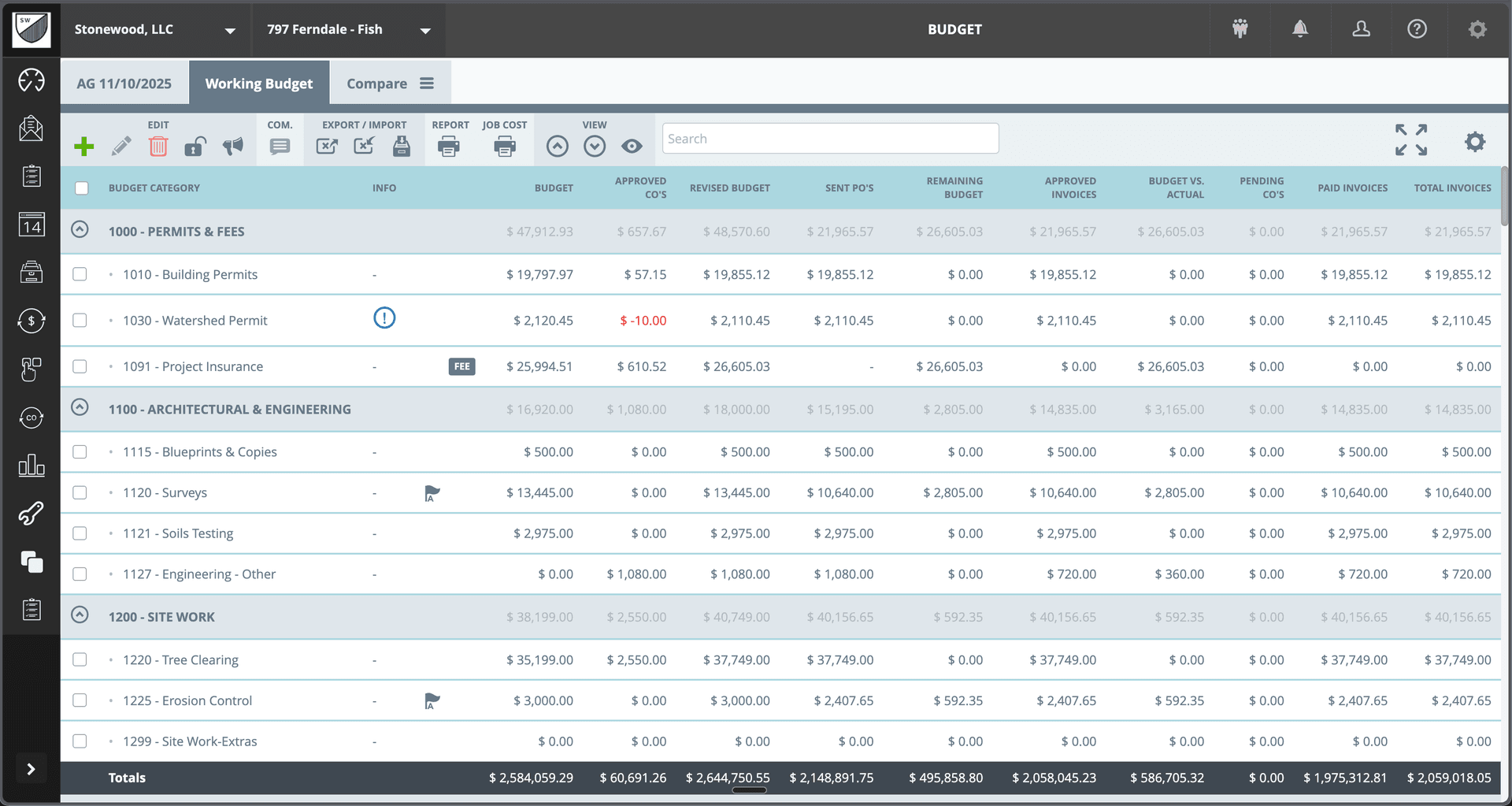
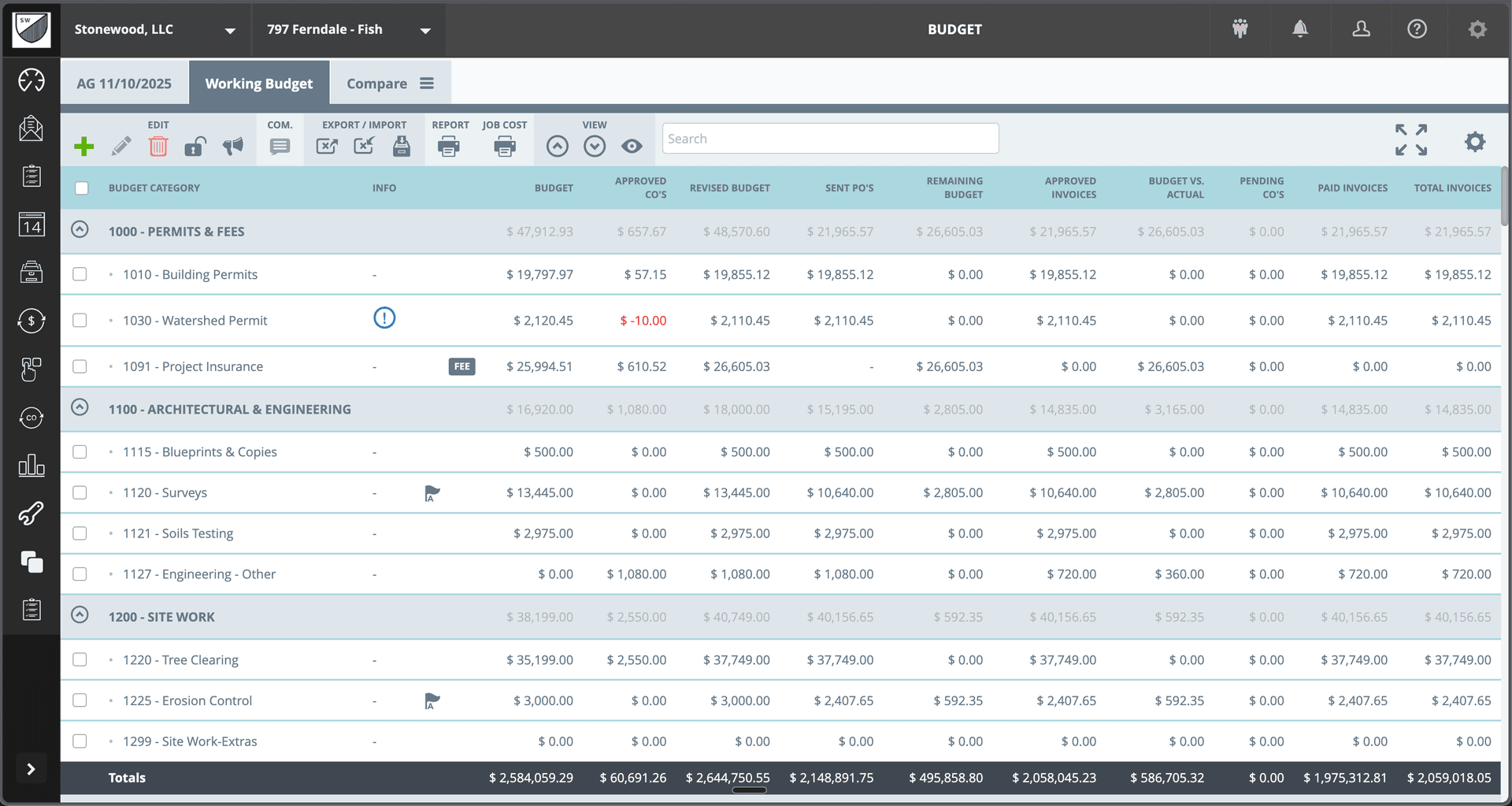
BuildTools budget tracking connects your estimates, change orders, purchase orders, and invoices into one live view. See exactly where you stand—by cost code, category, or entire project—at any moment.
Powerful Features for Budget Tracking
Everything you need to manage budget tracking effectively.
Hierarchical Cost Codes
Organize budgets by category and detailed cost codes. Roll up from individual items to categories to project totals. See the level of detail you need.
Change Order Integration
Approved change orders automatically update the revised budget. Track original budget, approved CO's, and revised totals in real-time.
PO & Invoice Tracking
See sent purchase orders, approved invoices, and paid amounts for every line item. Know your committed costs vs. actual spend.
Budget vs. Actual
Instantly compare revised budget to actual costs. Identify variances before they become problems.
Remaining Budget Visibility
See exactly how much budget remains for each cost code. Make informed purchasing and allocation decisions.
Flexible Reporting
Export budget reports for internal review or client presentation. Compare budgets across projects to improve estimating.
See It In Action
Real interface, real data, real results.
Why Builders Choose BuildTools
Real benefits that impact your bottom line.
Catch Overruns Early
Real-time variance tracking highlights problem areas while you can still take action. No more end-of-project surprises.
Make Informed Decisions
Know exactly what's available before committing to purchases or allowance spends. Negotiate from a position of knowledge.
Improve Estimating Accuracy
Compare estimates to actuals across projects. Learn where you consistently under- or over-estimate and adjust future bids.
Protect Your Margins
Tight financial control on every project means healthier margins and a more profitable business.
How Builders Use This Feature
Real scenarios from real custom home builders.
Weekly Budget Review
Review budget vs. actual across all active projects. Identify cost codes trending over budget and investigate before it's too late.
Proactive cost management instead of reactive scrambling
Client Allowance Management
Track allowance budgets and actual selections in real-time. Show clients exactly where they stand before they make choices.
Transparent allowance conversations
Change Order Impact
When a change order is approved, instantly see how it affects category budgets and project totals. Make sure pricing covers the full impact.
Accurate change order pricing
"We used to find out we'd lost money on a project after it was finished. Now I know exactly where we stand every single day. That visibility has completely changed how we run our business."
David Park
Park Custom Homes
Frequently Asked Questions
Common questions about budget tracking.
How does the budget connect to my estimates?
Can I track costs at the line item level?
How do change orders affect the budget?
Explore Related Features
See how other BuildTools features work together.
Financial Management
Change orders, invoices, purchase orders—construction financial management is complex. BuildTools streamlines every workflow with clear status tracking, easy approvals, and complete audit trails.
Learn moreEstimates & Proposals
Accurate, professional estimates win jobs. BuildTools estimating tools help you price confidently, present beautifully, and convert estimates to projects seamlessly—no re-entering data, no lost information.
Learn moreProject Management
Custom home projects have hundreds of moving parts. BuildTools brings everything together in one powerful dashboard—alerts, schedules, budgets, and team activity—so you always know exactly where every project stands.
Learn moreReady to Transform Your Budget Tracking?
See how BuildTools can help your business save time, reduce errors, and build more profitably.