Streamlined Financial Workflows
Change orders, invoices, purchase orders—construction financial management is complex. BuildTools streamlines every workflow with clear status tracking, easy approvals, and complete audit trails.
Financial Chaos Costs Real Money
If any of these sound familiar, you're not alone.
- 1
Change orders stuck in approval limbo for weeks
- 2
No clear status on which invoices have been approved or paid
- 3
Lost or disputed change orders leading to unpaid work
- 4
Manual tracking of financial documents in spreadsheets
- 5
Difficulty reconciling project finances with accounting
Complete Financial Control
BuildTools gives you one system for all project financial management. Create, track, and approve change orders. Process invoices. Connect everything to your budget and accounting system. Never lose track of money again.
Powerful Features for Financial Management
Everything you need to manage financial management effectively.
Change Order Management
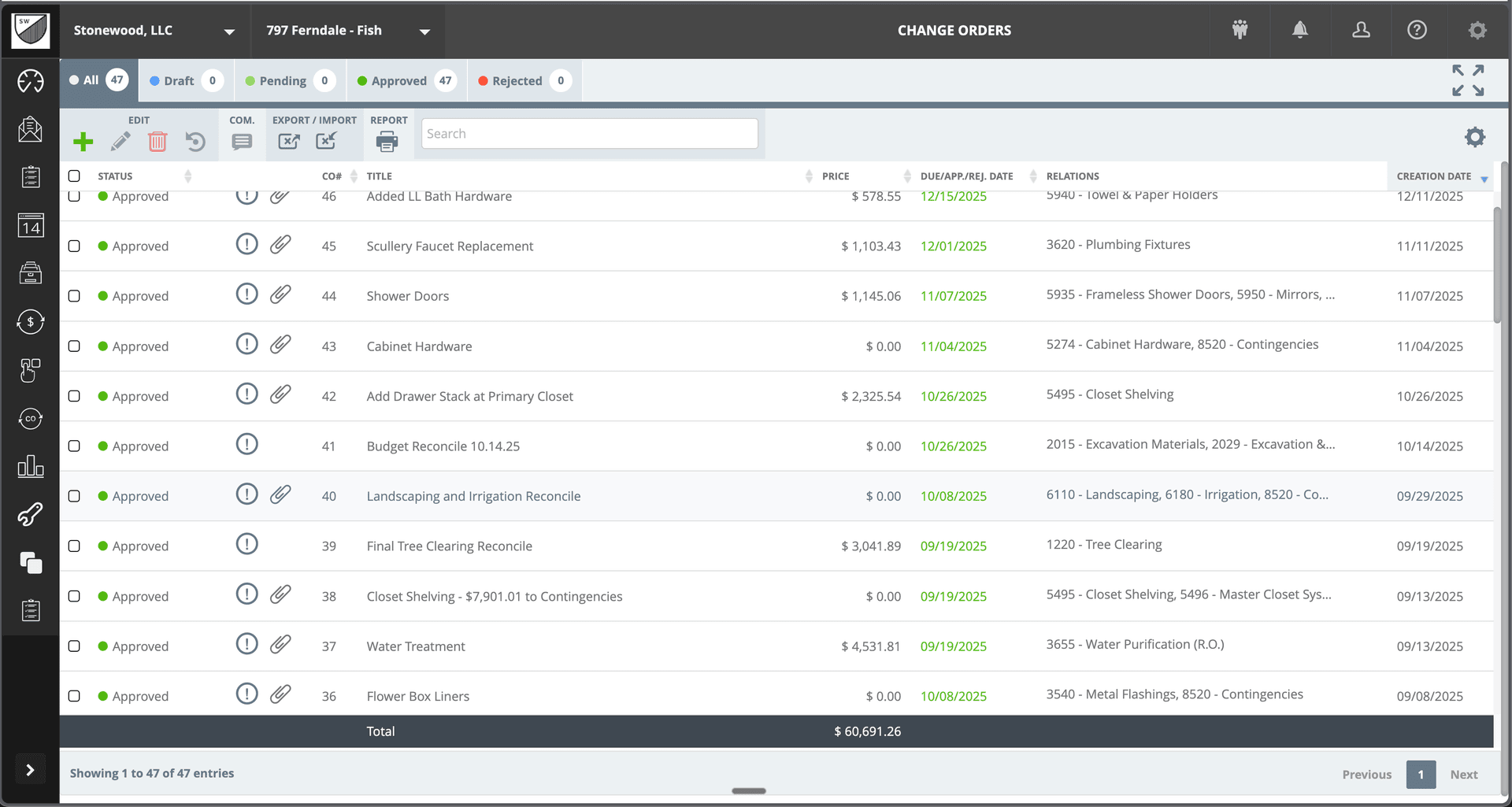
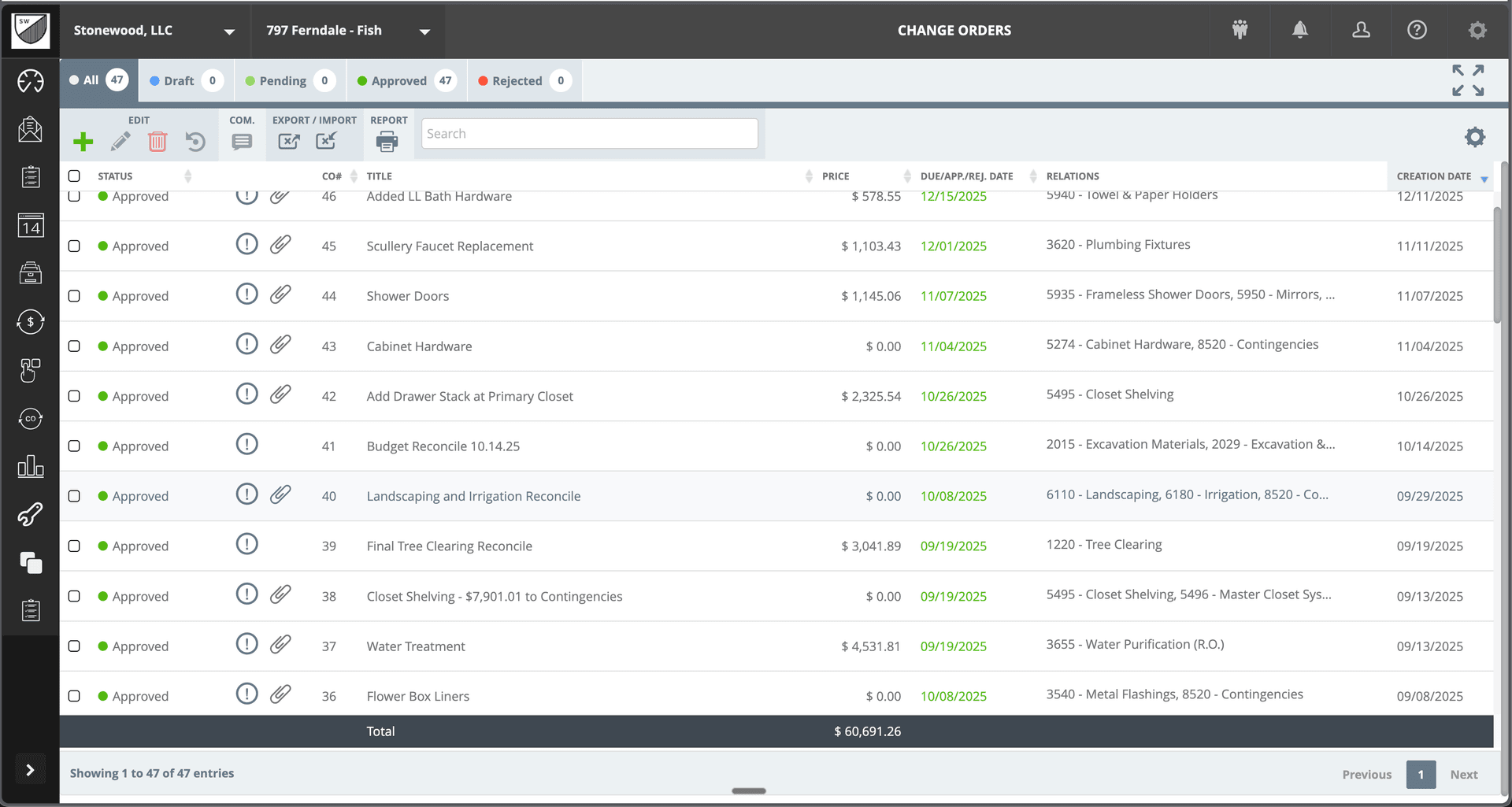
Create, track, and approve change orders through a clear workflow. Draft, Pending, Approved, Rejected—always know the status of every CO.
Digital Approvals
Send change orders for client approval electronically. Capture digital signatures and maintain a complete approval record.
Cost Code Integration
Every change order links to specific cost codes. Budgets update automatically when changes are approved.
Invoice Processing
Receive, approve, and track vendor invoices. Connect invoices to purchase orders and budget line items.
Complete Audit Trail
Every financial transaction is logged with timestamps, approvals, and related documents. Perfect record for disputes or audits.
QuickBooks Integration
Sync approved invoices and financial data with QuickBooks Online or Desktop. Eliminate double entry and keep books current.
See It In Action
Real interface, real data, real results.
Why Builders Choose BuildTools
Real benefits that impact your bottom line.
Faster Approvals
Digital workflows mean faster client approvals on change orders. No more waiting on paper documents.
Never Miss Revenue
Every change order tracked from creation to payment. Nothing falls through the cracks.
Simplified Reconciliation
Project financials stay in sync with your accounting system. Month-end closes become straightforward.
Dispute Protection
Complete documentation of every financial transaction. Protect yourself with indisputable records.
How Builders Use This Feature
Real scenarios from real custom home builders.
Client Requests a Change
Create a change order, price the work, and send it for client approval—all within BuildTools. Capture their digital signature and get started.
47 change orders managed on a single project
Invoice Processing
Receive a vendor invoice, match it to the purchase order, approve for payment. Invoice automatically updates budget actuals and syncs to QuickBooks.
Streamlined payables workflow
Financial Reconciliation
Review all pending change orders and unpaid invoices. Ensure nothing is stuck and cash flow projections are accurate.
Clear financial visibility
"Managing change orders used to be a nightmare—papers everywhere, approvals lost. Now everything is digital, tracked, and connected to our budget. We've captured thousands in revenue that would have slipped through."
Jennifer Walsh
Walsh Building Co.
Frequently Asked Questions
Common questions about financial management.
How do clients approve change orders?
Does BuildTools connect to QuickBooks?
Can I track change orders by category?
Explore Related Features
See how other BuildTools features work together.
Budget Tracking
Custom home budgets are complex—thousands of line items across hundreds of cost codes. BuildTools gives you real-time visibility into budget vs. actual, change order impacts, and remaining funds so you can protect your margins.
Learn moreEstimates & Proposals
Accurate, professional estimates win jobs. BuildTools estimating tools help you price confidently, present beautifully, and convert estimates to projects seamlessly—no re-entering data, no lost information.
Learn moreIntegrations
BuildTools integrates with QuickBooks Online and QuickBooks Desktop to keep your project management and accounting in sync. No double entry, no data mismatches—just seamless financial visibility.
Learn moreReady to Transform Your Financial Management?
See how BuildTools can help your business save time, reduce errors, and build more profitably.