
Streamlined Construction Scheduling: Online, Centralized, and Accessible to Your Team
It's 7:45 AM. Your framing crew arrives at the job site. The foundation isn't finished.
Nobody told them. The concrete sub ran late. The framer drove 45 minutes. Your schedule is now backed up, you're paying for a crew with nothing to do, and you're starting your day with angry phone calls.
This happens because scheduling is scattered. The schedule is in your head, half-updated in a spreadsheet, texted to some subs, emailed to others, and completely unknown to your client.
The Real Cost of Schedule Chaos
Most builders focus on budget accuracy but ignore schedule costs. Yet schedule delays are often more expensive:
Direct Costs
Wasted Labor:
- Crews showing up when they can't work
- Standby time waiting for previous trade
- Rush charges making up lost time
Average Impact: $500-2,000 per scheduling conflict
Extended Overhead:
- Every week of delay extends project overhead
- Site supervision, insurance, permits, financing costs
- Portable facilities, utilities, site security
Average Impact: $1,500-3,000 per week of delay
Indirect Costs
Client Relationships:
- "When will you be done?" asked weekly
- Planned move-in dates missed
- Client stress and frustration
Subcontractor Relationships:
- Subs called too early (annoyed)
- Subs called too late (scheduling conflict)
- Repeated reschedules erode goodwill
Business Growth:
- Can't commit to new projects confidently
- Limited by your personal bandwidth to coordinate
- Projects backing into each other
The Reputation Cost
Your client tells 10 friends about their building experience. If schedule chaos was part of that story, what are they saying about you?
Why Traditional Scheduling Fails
The Spreadsheet Schedule
Most builders start with a Gantt chart or Excel schedule. Problems:
Problem 1: It's Static You build it once. It's out of date by day three. Updating it takes hours, so you don't.
Problem 2: It's Not Accessible The schedule is on your computer. Your crew, subs, and client can't see it. So they text you: "When am I scheduled?"
Problem 3: Dependencies Break Framing depends on foundation. Drywall depends on rough-ins. Your spreadsheet doesn't know this. When foundation delays, you're manually pushing everything back.
Problem 4: No Real-Time Updates Schedule changed? Now you email it to everyone. Again. Did they see it? Who knows.
The Calendar Chaos
Some builders use Google Calendar or Outlook:
Problem 1: Fragmented View Each project is different calendar events. Seeing overall capacity across projects requires switching views constantly.
Problem 2: No Trade Coordination Electrician scheduled Tuesday. Plumber scheduled Wednesday. But electrician needs three days. They'll overlap. Calendar doesn't care.
Problem 3: No Client Visibility Your client can't see the construction calendar, so they text constantly asking for updates.
The "In My Head" Schedule
The worst approach: experienced builders who just "know" the sequence:
Problem 1: Doesn't Scale Works for 2-3 projects. Breaks at 5+.
Problem 2: Not Communicable Your team doesn't know what you know. Neither do your subs.
Problem 3: Single Point of Failure You get sick, go on vacation, or just have a busy week—everything grinds to halt.
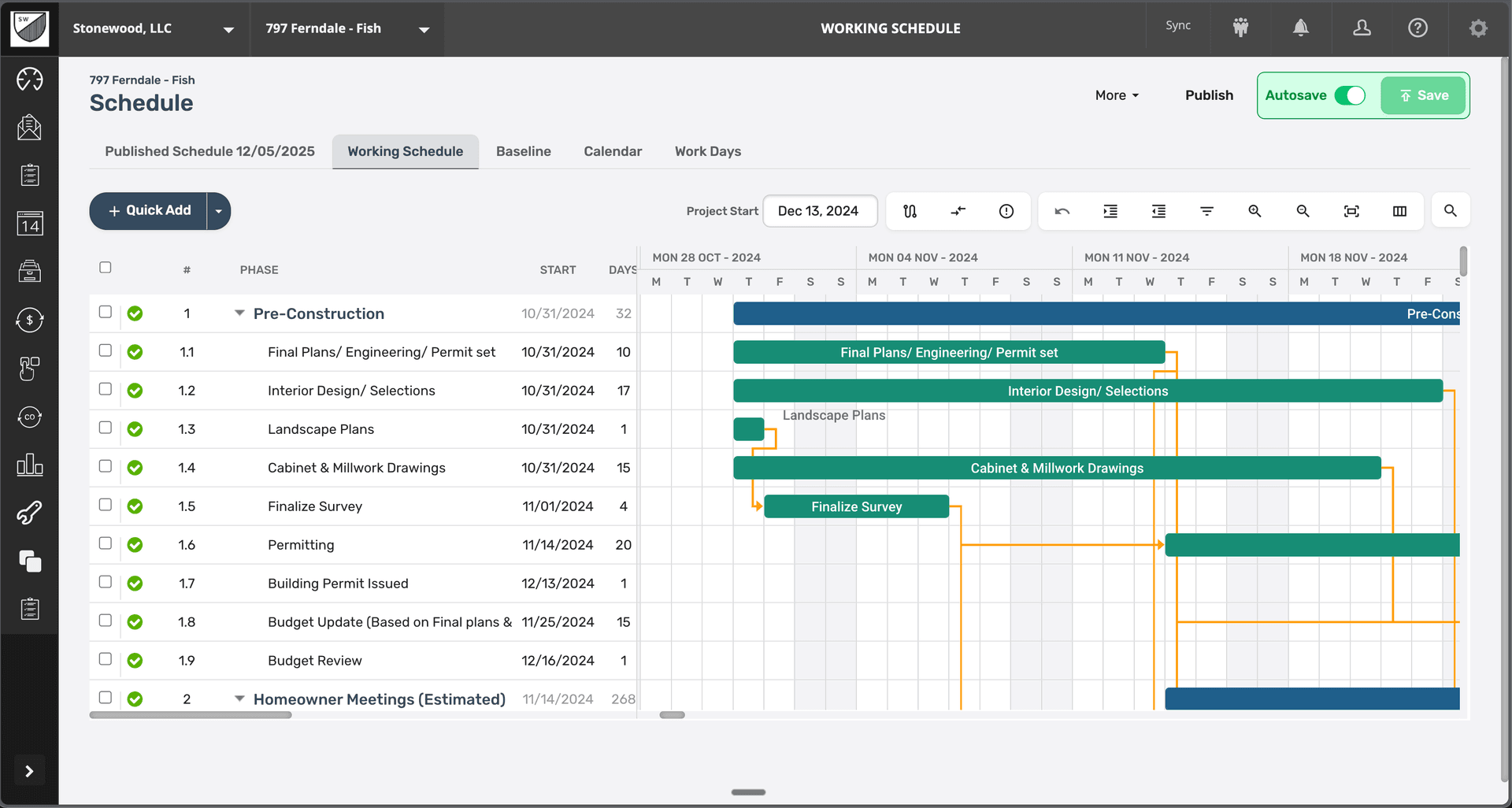
BuildTools: Scheduling That Actually Works
BuildTools treats your schedule as a living coordination tool, not a static document.
1. Centralized Project Schedule
Every project has a master schedule visible to everyone who needs it:
Your View (Complete Control):
Project: 789 Pine Street
Timeline: Jan 15 - June 30 (24 weeks)

Current Phase: Framing (Week 8 of 24)
├── Foundation - Complete ✓
├── Framing - In Progress (85% complete)
├── Rough-Ins - Scheduled (starts Feb 28)
└── Drywall - Scheduled (starts Mar 14)

This Week (Feb 19-23):
├── Mon: Framing crew (final walls)
├── Tue: Framing inspection @ 2pm
├── Wed: Window delivery + install
├── Thu: Exterior door install
└── Fri: Wrap-up, site clean

Next Week (Feb 26-Mar 1):
├── Mon: Electrician starts rough-in
├── Tue: Plumber starts rough-in
├── Wed: HVAC rough-in begins
└── Fri: Rough-in inspection

⚠️ Weather Alert: Rain forecast Wed-Thu
→ Window install may need to reschedule
Subcontractor View (Their Scope Only):
ABC Electrical - Projects Scheduled

789 Pine Street:
└── Rough-In: Feb 26-Mar 1
    Prerequisites: Framing inspection passed ✓
    Access: Site unlocked, code 4582#
    Contact: Mike (555-0123)

Next: Final Electrical (Apr 15-17)
Client View (Milestone Progress):
Your Home at 789 Pine Street

Phase Progress:
├── Foundation: Complete ✓
├── Framing: 85% (on schedule)
├── Roof: Scheduled to start Mar 7
└── Move-In: On track for June 30 ✓

This Week:
└── Completing framing, installing windows

Next Major Milestone:
└── Rough-ins start Feb 26
    (Electrical, plumbing, HVAC run inside walls)
2. Automated Coordination
BuildTools understands trade dependencies:
Example Workflow:
You update the schedule: "Foundation completion delayed 3 days"
BuildTools automatically:
- Pushes framing start date back 3 days
- Adjusts all dependent tasks (rough-ins, drywall, etc.)
- Notifies affected subcontractors of new dates
- Updates client milestone timeline
- Flags potential conflicts with other projects
Manual Process Time: 2-3 hours BuildTools Automated: 30 seconds
3. Smart Notifications
The right people get notified at the right time:
7 Days Before: → Subcontractor: "You're scheduled for 789 Pine St on Feb 26. Confirm availability?" → Supplier: "Window delivery needed by Feb 21 for Feb 22 install."
3 Days Before: → You: "Framing inspection scheduled Tuesday 2pm. Prerequisites complete? ✓"
1 Day Before: → Crew: "Tomorrow: Window install at 789 Pine St. Weather: Clear ✓" → Client: "Windows being installed tomorrow!"
Day Of: → You: "Windows delivered ✓ Installer onsite ✓"
Completion: → All: "Windows installed and inspected ✓" → Schedule: "Trigger next phase: Exterior door install"
4. Multi-Project Coordination
See your entire company schedule:
Week View:
February 19-23, 2024

Monday:
├── 789 Pine St: Framing crew
├── 456 Oak Ave: Drywall starts
└── 123 Maple Ln: Final walkthrough

Tuesday:
├── 789 Pine St: Framing inspection 2pm
├── 456 Oak Ave: Drywall continues
└── 321 Birch Dr: Foundation pour

⚠️ Conflict Detected:
└── Mike scheduled at both 789 Pine (inspection)
    and 321 Birch (pour supervision) on Tuesday
    → Reschedule one?
Capacity View:
Current Workload:

Projects Active: 6
Projects Starting Next 30 Days: 2
Projects Completing Next 30 Days: 1

Team Capacity:
├── Mike (PM): 95% (near capacity)
├── Sarah (PM): 70% (can take more)
└── Framing Crew: Booked through Mar 15

Subcontractor Capacity:
├── ABC Electrical: Available
├── XYZ Plumbing: Booking 3 weeks out
└── Pro HVAC: Available
5. Real-Time Updates from the Field
Schedule changes happen on site. Update from anywhere:
Mobile App Example:
It's 10am on site. Framing inspection passed.
You open BuildTools mobile:
- Mark "Framing Inspection" complete ✓
- Add inspector notes and approval photo
- Schedule auto-updates next phase to start tomorrow
- Electrician gets notification: "Ready for rough-in Feb 26"
Time to update: 30 seconds People notified: Everyone who needs to know Schedule accuracy: Always current
6. Weather Integration
BuildTools monitors weather for your projects:
789 Pine Street Schedule

⚠️ Weather Alert:
└── Heavy rain forecast Wed-Thu (Feb 21-22)

Affected Tasks:
├── Window install (exterior work)
└── Roofing material delivery

Suggested Action:
→ Reschedule window install to Friday
→ Delay roofing delivery to next week
→ Notify window installer and client

Updated Schedule:
├── Wed-Thu: Interior framing completion
└── Fri: Window install (weather clear)
Real-World Impact: Case Study
Before BuildTools: Schedule Telephone
Builder: Tom, remodeling contractor in Oregon Projects: 4-5 active remodels simultaneously Pain Point: Constant coordination chaos
Typical Day:
- 6:30 AM: Electrician texts "Am I working today?"
- 7:15 AM: Drywall crew shows up, electrical rough-in not done
- 8:00 AM: Client calls "When is my kitchen functional?"
- 9:30 AM: Plumber calls "I'm wrapped up early, need me anywhere?"
- 11:00 AM: Realize you double-booked yourself for inspections
- Throughout day: Endless calls/texts coordinating
Weekly Time on Scheduling: 15-20 hours Schedule Conflicts per Week: 3-5 Client Satisfaction: Declining
After BuildTools: Coordinated Precision
Same Builder, Six Months Later:
Projects: 7 active remodels (increased capacity)
Morning Routine:
- 6:30 AM: Check BuildTools dashboard over coffee
- All day schedules visible
- Any conflicts flagged
- Weather alerts noted
- One inspection at 2pm confirmed
Throughout Day:
- Subs check their own schedules (no calls to Tom)
- Updates posted in real-time from job sites
- Clients see progress in their portal
- Tom focuses on building, not coordinating
Weekly Time on Scheduling: 3-4 hours Schedule Conflicts: 0-1 (caught proactively) Client Satisfaction: "They kept us informed every step"
Business Impact:
- Added 2-3 more projects without hiring coordinator
- Improved on-time completion from 60% to 95%
- Reduced subcontractor complaints by 80%
- Clients specifically mention "great communication" in reviews
Best Practices for Scheduling Success
1. Build Your Template Schedule
Create a master schedule template for your typical project:
Custom Home Template (example):
Week 1-2: Site prep, excavation, foundation
Week 3-5: Framing, roof
Week 6-7: Rough-ins (MEP)
Week 8: Rough inspection
Week 9-10: Insulation, drywall
Week 11: Interior trim, cabinets
Week 12: Finish work
Week 13: Final inspection, punch list
BuildTools lets you:
- Save as template
- Apply to new projects
- Adjust for project specifics
- Scale timeline up/down based on size
Setup Time: 2-3 hours once Time Saved Per Project: 4-6 hours
2. Update from the Field
Make schedule updates a daily habit:
End of Day (5 minutes):
- Mark completed tasks ✓
- Note any delays or issues
- Confirm tomorrow's schedule
- Update progress percentages
Why It Matters:
- Schedule stays current
- Tomorrow's crew knows the plan
- Clients see progress
- Issues flagged early
3. Build Buffer Time
Don't schedule back-to-back with zero buffer:
Risky Schedule:
Drywall: 5 days (Mon-Fri)
Paint prep: Starts Monday (next week)
If drywall runs even one day late, everything dominoes.
Smart Schedule:
Drywall: 5 days scheduled, 7 days allowed
Buffer: Weekend + Monday
Paint prep: Starts Tuesday (next week)
BuildTools shows scheduled vs. buffer time, so you can see real vs. padded deadlines.
4. Color-Code by Trade
Visual scheduling helps spot conflicts:
- 🔵 Foundation/Concrete
- 🟢 Framing/Carpentry
- 🟡 Electrical
- 🔴 Plumbing
- 🟣 HVAC
- 🟠 Drywall/Paint
Quick glance shows trade distribution and potential conflicts.
5. Weekly Look-Ahead
Every Friday, review next week's schedule across all projects:
- Confirm subcontractor availability
- Verify material deliveries
- Check inspection schedules
- Flag potential conflicts
- Adjust as needed
Time Investment: 30 minutes Issues Caught Proactively: Countless
Advanced Features
Milestone Tracking
Link payments to milestone completion:
Payment Schedule - 789 Pine Street

├── Deposit: $68,000 (Paid ✓)
├── Foundation: $102,000 (Paid ✓)
├── Framing: $136,000 (Due upon completion)
│   └── Status: 85% complete
├── Rough-In: $102,000 (Due upon inspection)
└── Final: $68,000 (Due at closing)

Next Payment Due:
└── When "Framing" marked complete
    → Auto-generates invoice
    → Client notified
Resource Allocation
Track team and equipment across projects:
Mike's Schedule - Next 2 Weeks

Week of Feb 19:
├── Mon: 789 Pine (framing completion)
├── Tue: 789 Pine (inspection)
├── Wed: 456 Oak (drywall start)
├── Thu: 123 Maple (client meeting)
└── Fri: 321 Birch (site review)

Week of Feb 26:
├── Mon: 789 Pine (rough-in start)
├── Tue: Available (40%)
├── Wed: 456 Oak (inspection)
└── Thu-Fri: Available (80%)

→ Capacity to take on small project or handle issues
Critical Path Analysis
BuildTools identifies your critical path:
789 Pine Street - Critical Path

Tasks that CANNOT be delayed without pushing completion:

├── Framing inspection (Tue) ⚠️ CRITICAL
│   └── Delays everything after
├── Rough-in completion (Mar 1) ⚠️ CRITICAL
│   └── Required for drywall
├── Final inspection (Jun 20) ⚠️ CRITICAL
│   └── Required for closing Jun 30

Tasks with buffer time:
├── Exterior paint (5 days scheduled, 3 needed)
├── Landscaping (can flex by 2 weeks)
└── Final cleaning (can be rushed if needed)
Focus your attention where it matters most.
Client Communication
Clients see their schedule in plain language:
Professional Builder View:
Feb 26: MEP rough-in begins
Mar 1: Rough-in inspection
Mar 4: Insulation installation
Client-Friendly View:
Feb 26: Electrical, plumbing, and heating being
        installed inside walls

Mar 1: City inspection of electrical, plumbing, heating

Mar 4: Insulation being added for energy efficiency

What this means: We're making great progress! Your walls will be closed up by mid-March, and you'll really start to see your home take shape.
Getting Started with BuildTools Scheduling
Week 1: Build Your First Schedule
- Create project timeline
- Add major milestones
- Break down into weekly tasks
- Assign durations and dependencies
Time: 2-3 hours for first project
Week 2: Add Your Team
- Invite subcontractors to platform
- Assign tasks to trades
- Set up notification preferences
- Share client portal access
Time: 1-2 hours
Week 3: Go Live
- Start updating schedule daily
- Mark tasks complete as they finish
- Adjust dates as needed
- Monitor notifications and responses
Time: 5-10 minutes daily
Week 4+: Optimize
- Add new projects using template
- Refine buffer times based on actuals
- Improve estimation for task durations
- Leverage analytics for better planning
Common Questions
Q: What if my subs don't use technology? A: They don't need to log in. BuildTools sends text/email notifications. They can confirm via text reply.
Q: Can I still use my existing Gantt chart software? A: Yes, BuildTools integrates with Microsoft Project and other tools, or you can use BuildTools' built-in Gantt view.
Q: What about last-minute changes? A: Update from your phone in seconds. Affected parties are notified automatically.
Q: How detailed should my schedule be? A: Start with weekly milestones. Add detail as needed. BuildTools scales with you.
Q: Can clients reschedule tasks? A: No. Clients see the schedule but can't modify it. They can request changes through the platform.
The Bottom Line
Your schedule is the backbone of project success. When everyone knows the plan, shows up when they should, and completes work on time, everything else gets easier.
BuildTools doesn't just track your schedule—it coordinates your entire team, keeps clients informed, and helps you run more projects simultaneously without chaos.
One schedule. Always current. Accessible to everyone. That's how professional builders work.
Start Scheduling Smarter Today
See how centralized, online scheduling transforms coordination. Schedule a demo with our team to learn more.
Questions about migrating your existing schedules to BuildTools? Contact us for migration support.