
Construction Document Management: Stop Losing Time, Money, and Your Mind
"Where's the signed change order from last week?"
"Which version of the plans did we give to the electrician?"
"I know we have that warranty document somewhere..."
Sound familiar? If you're spending more time searching for documents than reviewing them, you're not alone—and you're losing money every single day.
The Real Cost of Document Chaos
Let's do the math on what poor document management actually costs:
Time Waste
- 8-12 hours per week searching for documents (average for small builders)
- 2-3 hours per week recreating lost documents
- 15-20 minutes per day answering "where is...?" questions from team members
- Annual cost: 500-750 hours of productive time lost
At $100/hour value of your time, that's $50,000-75,000 annually just in search time.
Project Delays
- Change orders delayed because you can't find client approvals
- Subcontractors working from outdated plans
- Permit applications stalled waiting for required documentation
- Result: 5-10 day delays per project on average
Costly Mistakes
- Building from superseded plans
- Ordering materials based on outdated specifications
- Missing warranty claim deadlines
- Failing inspections due to missing documentation
Client Relationship Damage
- "I already signed that two weeks ago..."
- "Weren't you at that meeting where we discussed...?"
- "This is the third time I'm sending you this..."
The Traditional Approach (That Doesn't Work)
Most builders cobble together a system from:
Email: Important documents buried in threads, attached to messages from months ago, scattered across multiple email accounts
Dropbox/Google Drive: Folder structures that made sense 3 years ago but now nobody can navigate, version control nightmares, broken share links
Paper Files: Filing cabinets in the office that nobody's at anymore, job boxes that get left on site, folders that go missing
Phone Photos: Thousands of photos with cryptic filenames, eating up storage, impossible to find when you need them
Text Messages: Critical approvals and decisions lost in conversation threads
The Problem: No single source of truth. No standardized naming. No organized structure. No version control. No ability to quickly find what you need.
BuildTools: Document Management That Actually Works
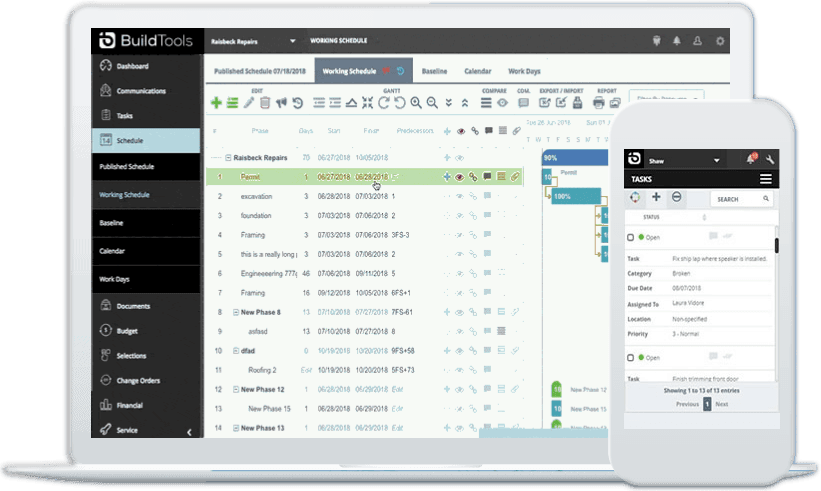
BuildTools transforms document chaos into organized, accessible, searchable project files. Here's how:
1. Project-Centric Organization
Every document lives with its project. No more wondering "Was that in the Johnson file or the Jackson file?"
Project: 123 Maple Street
├── Contracts
│   ├── Original Contract - Signed.pdf
│   ├── Change Order 001 - Kitchen.pdf
│   └── Change Order 002 - Deck Addition.pdf
├── Plans & Drawings
│   ├── Architectural Plans - Rev A.pdf
│   ├── Architectural Plans - Rev B.pdf (CURRENT)
│   └── Site Plan.pdf
├── Specifications
│   ├── Finish Schedule.xlsx
│   └── Cabinet Specifications.pdf
├── Permits & Inspections
│   ├── Building Permit.pdf
│   └── Inspection Reports/
├── Photos
│   ├── Site Photos - Before/
│   ├── Progress Photos/
│   └── Final Photos/
├── Warranties & Manuals
│   ├── HVAC Warranty.pdf
│   └── Roof Warranty.pdf
└── Client Communications
    └── (All logged communications and approvals)
2. Automated Organization
Documents automatically organize themselves:
- Change Orders: Instantly filed under the project with sequential numbering
- Photos: Auto-tagged with date, location, and project
- Purchase Orders: Linked to budget line items and filed with project
- Emails: Client communications logged directly to project timeline
- Submittals: Tracked with approval status and filed appropriately
3. Version Control That Makes Sense
No more "Final_v2_FINAL_USE_THIS.pdf" nightmares:
- Clear Version History: See every revision, who uploaded it, and when
- Current Version Highlighted: Never accidentally use superseded plans
- Revision Notes: Know exactly what changed between versions
- Previous Versions Preserved: Access historical documents when needed
4. Instant Search and Retrieval
Find any document in seconds:
- Search by project name, client name, date range, document type
- Full-text search inside PDFs
- Filter by status, category, or custom tags
- Recent documents quick-access
Example: "Show me all signed change orders for the Thompson project from Q4" - Results in 3 seconds instead of 30 minutes digging through files.
5. Access Anywhere, Anytime
- Office Desktop: Full document management interface
- Job Site Tablet: Review plans, upload photos, access specs
- Mobile Phone: Quick reference, photo uploads, document approval
- Subcontractor Access: Share specific documents without losing control
6. Controlled Sharing
Share the right documents with the right people:
- Clients: Custom portal showing their project documents, photos, and timeline
- Subcontractors: Access to plans, specifications, and schedules for their scope only
- Suppliers: Share cut sheets and specifications for accurate quotes
- Architects/Engineers: Collaboration on design documents
- Lenders/Inspectors: Provide required documentation instantly
Security: You control who sees what. Grant and revoke access with a click. Track who viewed what and when.
Real-World Implementation: Week-by-Week
Week 1: Foundation Setup
Time Investment: 4-6 hours
- Create project folders for all active jobs
- Upload critical documents (contracts, plans, permits)
- Establish your folder structure template
- Train team on basic upload and access
Immediate Benefit: Current project documents centralized and accessible
Week 2: Communication Integration
Time Investment: 2-3 hours
- Start logging client communications in BuildTools
- Set up email integration for automatic logging
- Upload photos from phone and tag appropriately
Immediate Benefit: Complete communication history with clients
Week 3: Full Document Migration
Time Investment: 6-8 hours
- Migrate historical project documents
- Organize warranty and maintenance documents
- Set up templates for recurring document types
Immediate Benefit: Nothing lost in old filing systems
Week 4+: Optimization
Time Investment: 1-2 hours
- Refine folder structures based on usage
- Set up automated workflows for common document types
- Train subcontractors on accessing shared documents
Ongoing Benefit: Every new project starts organized from day one
Game-Changing Features
Photo Management
Before BuildTools:
- 15,000 photos on your phone labeled "IMG_20231015_143256.jpg"
- No idea which project, what room, or why you took them
- Email attachments too large to send
- No backup if phone is lost/broken
With BuildTools:
- Photos auto-tagged with project, date, GPS location
- Organize into custom albums (Before/During/After, Room-by-Room, Issues, etc.)
- Annotate with notes and markup
- Share albums with clients and team
- Automatic cloud backup
- Time-lapse project visualization
Drawing Management
Before BuildTools:
- Multiple plan revisions floating around
- Subcontractors working from different versions
- Printing and carrying paper plans to job sites
- Missing the architect's latest email with Rev C
With BuildTools:
- Current revision always highlighted
- Comparison view between versions
- Mobile access eliminates printed plans
- Automatic notification when new version uploaded
- Markup and annotation tools for field notes
Change Order Documentation
Before BuildTools:
- Change order in email, approval in text, cost in spreadsheet, schedule impact unknown
- Weeks later: "Did they approve that?"
With BuildTools:
- Complete change order package: scope, cost, schedule impact, client approval
- Status tracking: Draft → Sent → Approved → In Progress → Complete
- Automatic budget and schedule updates
- Approval signatures captured and dated
- Complete audit trail
Best Practices from Successful BuildTools Users
1. Name Things Consistently
Establish naming conventions and stick to them:
- Projects: "Address - Client Last Name"
- Plans: "Type - Revision - Date"
- Photos: Auto-tagged by BuildTools, organized into albums
- Change Orders: Auto-numbered by system
2. Upload in Real-Time
Don't wait until "later":
- Take a photo on site? Upload immediately.
- Receive a signed document? Scan and upload right away.
- Get an email approval? Log it to the project instantly.
3. Use Consistent Folder Structures
Every project should have the same organizational structure. BuildTools lets you create templates, so each new project starts organized.
4. Tag and Categorize
Use BuildTools' tagging system:
- Document type (Contract, Plan, Specification, etc.)
- Status (Draft, Approved, Superseded)
- Custom tags for your business (Electrical, Plumbing, Framing, etc.)
5. Regular Cleanup
Monthly 15-minute review:
- Archive completed projects
- Delete duplicate uploads
- Update superseded plan status
- Verify critical documents are uploaded
The Compound Benefits
Document management isn't just about finding things faster—it creates cascading improvements:
Better Client Experience
- Instant answers to client questions
- Professional client portal access
- Complete photo galleries showing progress
- Transparent change order tracking
Improved Team Efficiency
- Team members self-serve document access
- Reduced interruptions asking for files
- Clear version control prevents mistakes
- Remote access enables flexible work
Risk Reduction
- Complete audit trail for disputes
- All approvals documented and dated
- Warranty and maintenance records preserved
- Compliance documentation organized
Business Growth
- Onboard new team members faster with organized files
- Scale beyond owner's brain with accessible documentation
- Professional image attracts better clients
- Systems enable growth without proportional chaos
Common Questions
Q: What if I'm not tech-savvy? A: BuildTools is designed for builders, not IT professionals. If you can send an email with an attachment, you can use BuildTools. Plus, our support team provides personalized onboarding.
Q: What happens to my documents if I cancel? A: You own your data. Export everything before canceling. We provide complete data download.
Q: How much storage do I get? A: Unlimited. Upload all your documents, photos, and files without worrying about storage limits.
Q: Can I access documents offline? A: Yes, the mobile app allows you to download documents for offline access on job sites with no service.
Q: What about document security? A: Bank-level encryption, secure cloud storage, controlled access permissions, automatic backups, and SOC 2 compliance.
The Bottom Line
Every hour spent searching for documents is an hour not spent building, selling, or growing your business. Every document lost is a potential lawsuit, delayed project, or damaged client relationship.
Proper document management isn't optional for professional builders—it's the foundation of running a legitimate construction business.
BuildTools doesn't just store your documents; it transforms how you work, communicate, and grow your business.
Start Organizing Today
Experience the difference organized project files make. Our team can help you establish the folder structures and workflows that fit your business.
Questions about document management for your specific business needs? Contact us for a personalized consultation.