

A homeowner asks for a small favor. "Can we move that outlet six inches? Can we upgrade to the wider plank flooring? Can we add a window in the mudroom while the wall is still open?"
Each request takes thirty seconds to say and feels harmless. The superintendent nods, says "yeah, no problem," and moves on with the day. Three months later, at closeout, the builder is staring at a job that came in on budget for materials and labor but somehow made almost no money. Nobody stole anything. Nobody made a huge mistake. The job just bled out through two dozen small "yeah, no problem" moments that were never priced, never documented, and never billed.
This is the single most common way custom home builders and remodelers lose margin, and it rarely shows up as one dramatic failure. It shows up as a slow leak. Ask any builder what keeps them up at night and change orders - not permits, not labor shortages, not material costs - are usually at the top of the list. Scope changes are constant on custom and remodeling work. The problem was never that change happens. The problem is that most builders still manage it with a system built for a world where change was rare.
Why Change Orders Quietly Eat Your Margin
On a fixed-price or cost-plus custom build, your margin is set the day you sign the contract. Every change to scope after that is either a chance to protect that margin or a chance to destroy it. There is no neutral option.
Here's the math nobody wants to run: if a builder is targeting an 18% net margin and lets even 3% of total contract value slip through as unbilled or under-priced changes, that's not a rounding error - it's a meaningful chunk of the profit on the entire job, gone. Multiply that across a 10-job pipeline and it's the difference between a good year and a break-even one.
The leak happens in a few predictable places:
- Verbal approvals with no paper trail. The client says "sure, go ahead" on a walkthrough, work happens, and three weeks later nobody can agree on what was actually approved or at what price.
- Underpriced changes. The field team estimates cost on the fly, forgets overhead and profit markup, and the change order goes out at cost - or close to it.
- Delayed documentation. The change gets written up two weeks after the work is done, once memory has faded and the real labor hours are hard to reconstruct.
- Changes that never get billed at all. Small requests get absorbed as "goodwill" because writing up a formal change order for a $400 item feels like more trouble than it's worth. Do that fifteen times on a job and it adds up to real money.
- No link between the change and the schedule. A change order gets approved but nobody adjusts the completion date or notifies the trades whose sequencing just shifted, creating downstream costs that never get captured either.
None of these are dramatic. That's exactly why they're dangerous. A builder can point to a single bad subcontractor bid or a permit delay and explain it. Nobody can point to twenty-two small approvals that never made it onto paper.
The Real Cost of a "Verbal Yes"
"Sure, that's fine, just go ahead and do it." - the six words that cost more custom builders their margin than any single line-item mistake ever has.
A verbal yes feels efficient in the moment. It keeps the relationship warm and the job moving. But it shifts all of the risk onto the builder. If the price was never confirmed in writing, the builder absorbs any dispute about cost. If the scope was never defined precisely, the builder absorbs any disagreement about what was actually included. If the schedule impact was never communicated, the builder absorbs the client's frustration when the closing date slips and nobody explained why.
Worse, verbal approvals train clients to expect that changes are free or informal. Once a client has gotten three "sure, no problem" changes in a row, the fourth one - the one that actually needs a $6,000 change order - becomes an uncomfortable conversation instead of a routine business transaction. The builder who documents and prices every change, even the small ones, from day one sets a completely different tone for the entire project.
What a Change Order Process Should Actually Look Like
A change order isn't paperwork for paperwork's sake. Done right, it's the single tool that protects your margin, keeps the client informed, and keeps the schedule honest. A solid process has four non-negotiable steps, and they happen in this order every time:
- Document the request. Who asked for it, what exactly is changing, and why. This can be a quick photo and a note from the field, but it has to exist somewhere other than someone's memory.
- Price it completely. Labor, materials, subcontractor cost, and - critically - your standard overhead and profit markup. If your standard margin on new work is 18%, your change order markup should be 18% too. A change order priced at cost is a change order that actively dilutes your overall project margin.
- Get written approval before work starts. Not after. A signature or a documented digital approval, tied to a specific price and scope, before a single hour of labor goes into it.
- Update the contract, budget, and schedule together. The revised contract total, the updated budget, and the adjusted schedule should all move at the same time the change order is approved - not as three separate follow-up tasks that someone might forget.
Skip any one of these steps and the leak reopens. Skip step two - the markup - and you're doing free work disguised as "keeping the client happy." Skip step three and you're exposed to disputes. Skip step four and your schedule and budget quietly drift out of sync with reality, and you won't find out until it's too late to fix cheaply.
The Anatomy of a Change Order That Protects Your Margin

A change order that actually protects your business has a few specific things on it, every time, no exceptions:
- A clear, specific description of the scope change - not "kitchen updates" but "relocate island electrical outlet 6 inches west, upgrade counter to quartz from laminate."
- An itemized cost breakdown showing labor, materials, and subcontractor costs separately, so both you and the client can see exactly where the number comes from.
- Your standard overhead and profit markup, applied consistently - the same way it's applied to every line item in the original contract.
- The schedule impact, even if it's "no impact" - clients need to see that this was actually evaluated, not just assumed.
- A running total showing original contract value, all approved changes to date, and the new revised contract total, so nobody is surprised at closeout.
- A clear approval mechanism with a date and a name attached to it.
That last point about the running total matters more than most builders realize. A client who sees a single change order in isolation might not think much of a $2,000 add. A client who sees "you are now at $31,000 in approved changes on a $400,000 contract" understands the cumulative picture - and that transparency, delivered consistently, is what keeps trust intact even as the number grows.
Common Change Order Mistakes That Cost Builders Thousands
Even builders who know better fall into the same handful of traps:
- Treating small changes as exceptions to the process. The $300 changes are exactly the ones that get skipped, and they're also the ones that happen most often - which is exactly why they add up.
- Letting field supervisors verbally price work on the spot. Good field leaders are great at construction, not always great at remembering every cost component under pressure. Pricing needs a consistent method, not a gut estimate delivered in the driveway.
- Waiting until the end of the month to batch-process change orders. By the time the paperwork catches up, labor hours are misremembered, material costs may have shifted, and the client has already forgotten agreeing to anything.
- Not tying change orders to the schedule. A change order that adds two weeks of work but never touches the project timeline creates a schedule that's technically wrong from that point forward - and a client who can't understand why the "on-time" job is suddenly late.
- No single source of truth. When change orders live in email threads, text messages, a paper folder, and a spreadsheet all at once, nobody - including the builder - has an accurate picture of the real contract value on any given day.
How BuildTools Turns Change Orders From a Liability Into a Profit Center
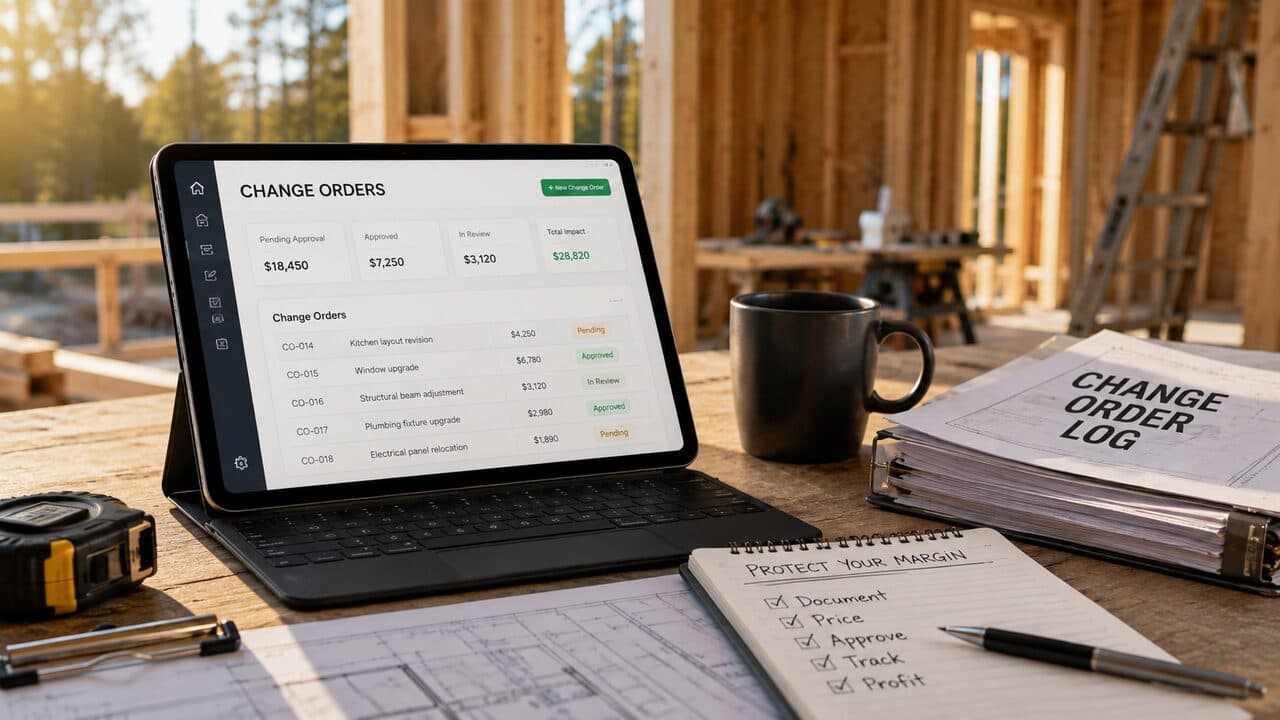
This is exactly the workflow BuildTools was built to support. BuildTools is construction management software built specifically for custom home builders and remodelers, and change order management sits at the center of it rather than being bolted on as an afterthought.
Inside BuildTools, a change order is never a disconnected document. It's created directly against the live project budget, so labor, materials, and subcontractor costs pull from real numbers instead of a guess written on a legal pad. Your standard markup is applied automatically and consistently, so nobody has to remember to add it - and nobody accidentally sends out a change order priced at cost. The approval happens digitally, with a clear record of who approved what and when, so there's never a dispute about whether something was authorized.
The part that matters most for protecting margin: when a change order is approved in BuildTools, the contract total, the job budget, and the project schedule update together. There's no separate spreadsheet to remember to update, no manual step where the schedule drifts out of sync with what was actually approved. Builders can see, at any point in the job, exactly what the original contract was, what's been approved in changes, what's still pending, and what the revised contract total and projected margin actually look like - the same running picture a client sees when they log in to review their project.
That visibility changes the conversation with clients too. Instead of an uncomfortable surprise at closeout, clients see the cumulative change order total build transparently over the life of the project, with each one documented, priced, and approved in writing. Builders using BuildTools consistently report that formalizing this process - making every change order visible, priced correctly, and tied to the schedule - is one of the fastest ways to recover margin that used to disappear quietly on every job.
Change order management isn't a paperwork problem. It's a margin protection system, and BuildTools is built to make that system the path of least resistance instead of the extra step everyone skips.
A Simple Change Order Workflow You Can Implement This Week
You don't need new software to start fixing this today - though it helps. Start here:
- Set a rule: no verbal approvals, ever. Even a quick digital approval from a phone counts. A verbal yes does not.
- Standardize your markup. Decide today what percentage gets applied to every change order, write it down, and apply it without exception - including on small requests.
- Price changes within 48 hours of the request, while the scope and labor estimate are still fresh, not at the end of the month.
- Tie every approved change to the schedule, even if the answer is "no impact." Make that evaluation part of the process, not an afterthought.
- Show clients the running total - original contract, approved changes, revised contract - every time, so there are no surprises at closeout.
Do this consistently for even one job and most builders are surprised by how much margin was quietly leaking through the gaps.
The Bottom Line
Change orders aren't the enemy - undocumented, underpriced, and unapproved change orders are. Custom home building and remodeling will always involve scope changes; that's the nature of the work. The builders who protect their margin aren't the ones who avoid change orders. They're the ones who treat every single change, no matter how small, with the same discipline: document it, price it completely, get it approved in writing, and connect it to the budget and schedule immediately.
That discipline is hard to sustain with a folder of paper forms and a group text thread. It's exactly what BuildTools was designed to make automatic. If change orders have been quietly eating into your margin on every job, it might be time to see what a real change order workflow looks like.
Want to see how BuildTools handles change order management on real projects? Book a walkthrough of BuildTools